
Description
-
Model List:
- EW27
- EW36
- EWR27
- EWR36 Production site LMH-NA
- 1. Service case Release tools for contacts
- 1.1. Table of content
- 1.2. Safety information
- 1.2.1. Safety information for repair and maintenance work
- 1.3. Information
- 1.3.1. Information
- 1.4. Overview
- 1.4.1. Overview of service cases
- 1.5. Plug systems
- 1.5.1. ATS 2.8 plug connector
- 1.5.2. CMC plug connector
- 1.5.3. DCS 9.5 plug connector
- 1.5.4. DIN 1.5mm circular connector
- 1.5.5. DIN 2.5mm circular connector
- 1.5.6. Deutsch DTM plug connector
- 1.5.7. ECU appliance plug
- 1.5.8. MCON appliance plug
- 1.5.9. Appliance plug with JPT and MQS contacts
- 1.5.10. Appliance plug with MT2 and JPT contacts
- 1.5.11. SICMA appliance plug
- 1.5.12. Econoseal JMark 2 plug connector
- 1.5.13. Elobau 11pin receptacle housing
- 1.5.14. E5931 plug connector
- 1.5.15. FASTINFASTON 6.3mm plug connector
- 1.5.16. GT150 plug connector
- 1.5.17. HDSCS plug connector
- 1.5.18. JPT plug connector
- 1.5.19. JPT SLD plug connector
- 1.5.20. JPT plug connector Saab
- 1.5.21. JPT plug connector VW
- 1.5.22. Kompakt 1.1 plug connector
- 1.5.23. Bosch Kompakt 4 plug connector
- 1.5.24. Leavyseal plug connector
- 1.5.25. MCON 1.2mm LL plug connector
- 1.5.26. MCON 1.2mm CB plug connector
- 1.5.27. MCP plug connector
- 1.5.28. MetriPack 150 plug connector
- 1.5.29. MiniFit plug connector
- 1.5.30. Mini Universal MATENLOK plug connector
- 1.5.31. Mini relay socket for DFK 1.3 and MDK 1.3
- 1.5.32. MKR Plus plug connector
- 1.5.33. MQS plug connector
- 1.5.34. MR plug connector
- 1.5.35. MTA plug housing and fuse housing
- 1.5.36. MT2 plug connector
- 1.5.37. MT2 1.5mm plug connector VW
- 1.5.38. Multilock plug connector
- 1.5.39. MX150 plug connector
- 1.5.40. NG1 plug connector
- 1.5.41. Phönix Contact HC plug connector
- 1.5.42. PT 3F plug connector
- 1.5.43. Relay socket with SPT contacts for DFK 1.3.4 and MDK 1.3.4
- 1.5.44. Relay socket with SPT and MPT contacts
- 1.5.45. Fuse holder with SPT contacts
- 1.5.46. Sicma plug connector
- 1.5.47. SLK 2.8 plug connector
- 1.5.48. Souriau UTL7 plug connector
- 1.5.49. Superseal 1.5mm plug connector
- 1.5.50. Trident Neptune plug connector
- 1.5.51. Universal MATENLOK plug connector
- 1.5.52. VW 9.5mm plug connector
- 2. connectdesk
- 2.1. Table of content
- 2.2. Introduction
- 2.2.1. Linde connect
- 2.2.1.1. connect product family
- 2.2.1.2. Function modules in connectdesk
- 2.2.1.3. Name history
- 2.3. System overview
- 2.3.1. Installation types
- 2.3.1.1. Singleuser system
- 2.3.1.2. Multiuser server system
- 2.3.1.3. Characteristics of installation types
- 2.3.2. Data transfer types
- 2.3.2.1. Bluetooth (singleuser system)
- 2.3.2.2. Bluetooth (multiuser server system)
- 2.3.2.3. WiFi
- 2.3.2.4. Mobile radio
- 2.3.3. connectcomposer mode of operation
- 2.3.3.1. connectcomposer as a Windows service
- 2.3.3.2. connectcomposer with GUI
- 2.4. Hardware
- 2.4.1. Input unit
- 2.4.1.1. Functional description
- 2.4.1.2. RFID input unit (transponder)
- 2.4.1.3. PIN input unit (keypad)
- 2.4.1.4. LED condition display
- 2.4.1.5. Product generations and technical data
- 2.4.2. Shock sensor
- 2.4.2.1. Functional description
- 2.4.2.2. Technical data
- 2.4.3. WiFi communication unit
- 2.4.3.1. Functional description
- 2.4.3.2. LED condition display
- 2.4.3.3. Technical data
- 2.4.3.4. Certifications
- 2.4.4. CDX20 communication unit from 08.2018
- 2.4.4.1. Functional description
- 2.4.4.2. LED condition display
- 2.4.4.3. Technical data
- 2.4.4.4. Certifications
- 2.4.5. CCE20 mobile radio communication unit (GPRS) up to 08.2018
- 2.4.5.1. Functional description
- 2.4.5.2. LED condition display
- 2.4.5.3. Technical data
- 2.4.5.4. Certifications
- 2.4.6. Truck Unit Small zi communication unit
- 2.4.6.1. Functional description
- 2.4.6.2. Safety information
- 2.4.6.3. LED status display
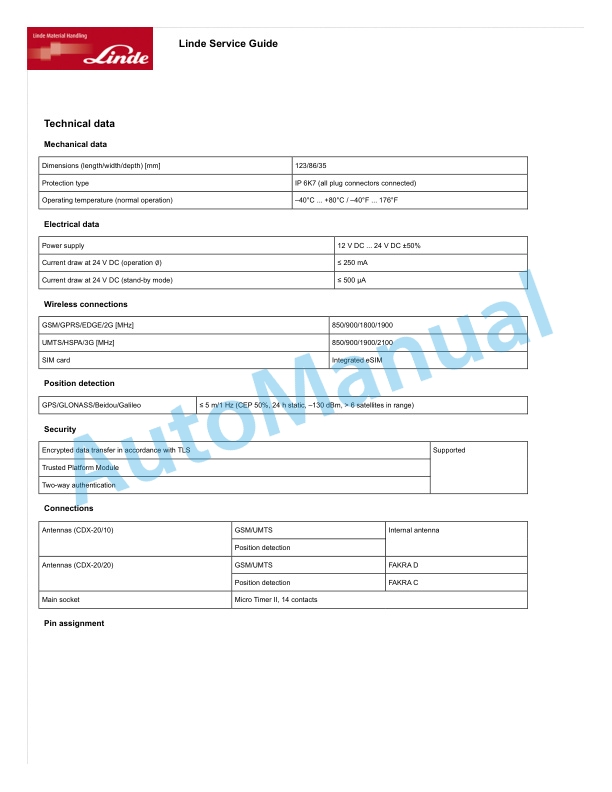
- 2.4.6.4. Technical data
- 2.4.6.5. Certifications
- 2.4.7. Zone Master
- 2.4.7.1. Functional description
- 2.4.7.2. Technical data
- 2.4.8. Zone Markers
- 2.4.8.1. Functional description
- 2.4.8.2. Technical data
- 2.4.9. Linde Bluetooth stick
- 2.4.9.1. Functional description
- 2.4.10. Desktop Reader
- 2.4.10.1. Functional description
- 2.4.10.2. Technical data
- 2.4.11. USB flash drive
- 2.4.11.1. Functional description
- 2.5. Software
- 2.5.1. Software help
- 2.5.1.1. Using the software help
- 2.5.1.2. Displaying menu paths
- 2.5.2. connectdesk
- 2.5.2.1. Logging in to connectdesk
- 2.5.2.2. user interface
- 2.5.2.3. Dashboard
- 2.5.2.4. Organisation
- 2.5.2.5. Managing drivers
- 2.5.2.6. Managing trucks
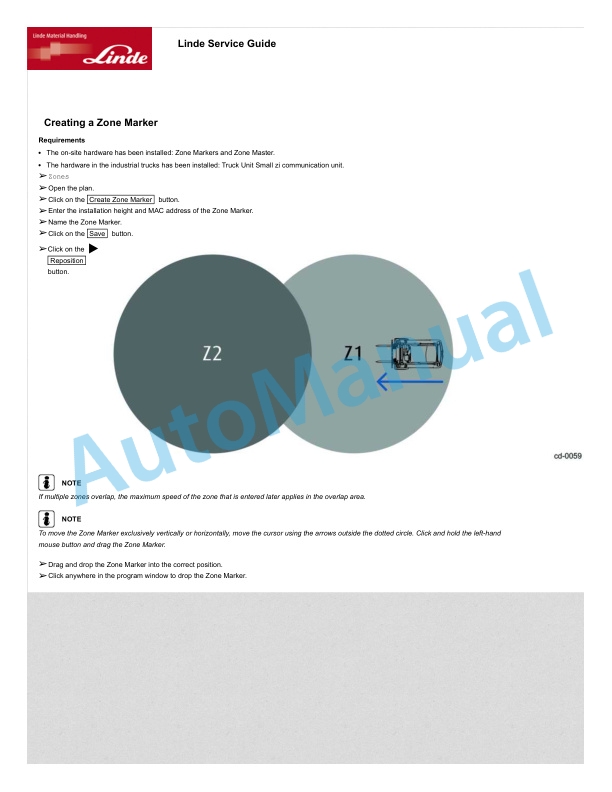
- 2.5.2.7. Zones
- 2.5.2.8. Reports
- 2.5.2.9. Settings
- 2.5.3. connectcomposer with GUI
- 2.5.3.1. connectcomposer user interface with GUI
- 2.5.3.2. Settings
- 2.5.3.3. Trucks
- 2.5.3.4. Firmware update
- 2.5.3.5. Shock recorder
- 2.5.3.6. GSM settings
- 2.5.3.7. WiFi settings
- 2.6. Status checking (PreOpCheck)
- 2.6.1. Functional description
- 2.6.1.1. PreOpCheck functional description
- 2.6.2. Input unit input method
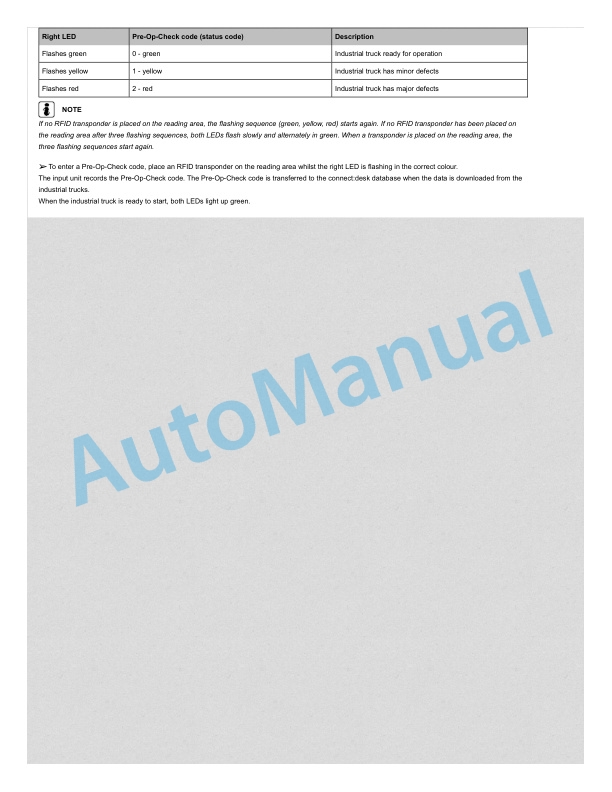
- 2.6.2.1. Performing the PreOpCheck (PIN input unit)
- 2.6.2.2. Performing the PreOpCheck (RFID input unit)
- 2.6.3. Smartphone input method
- 2.6.3.1. System requirements (Linde PreOpCheck app)
- 2.6.3.2. Performing the PreOpCheck (smartphone)
- 2.6.3.3. Adding a truck as a favourite
- 2.6.3.4. Activating the auto connect feature for a favourite
- 2.6.3.5. Loading checklists manually
- 3. connectportal
- 3.1. Table of content
- 3.2. Introduction
- 3.2.1. connect system
- 3.2.1.1. connect product family
- 3.2.1.2. Functional modules in connectportal
- 3.2.1.3. Name history
- 3.3. Data transfer
- 3.3.1. Mobile phone network
- 3.3.1.1. Functional description
- 3.3.1.2. Prerequisites
- 3.4. Hardware
- 3.4.1. CDX20 communication unit from 08.2018
- 3.4.1.1. Functional description
- 3.4.1.2. LED condition display
- 3.4.1.3. Firmware update
- 3.4.1.4. Technical data
- 3.4.1.5. Certifications
- 3.4.2. CDX10 radio transmission unit until 08.2018
- 3.4.2.1. Functional description
- 3.4.2.2. LED condition display
- 3.4.2.3. Firmware update
- 3.4.2.4. Technical data
- 3.4.2.5. Certifications
- 3.5. Software
- 3.5.1. Overview
- 3.5.1.1. Functional overview
- 3.5.1.2. Software requirements
- 3.5.1.3. Displaying the menu paths
- 3.5.2. First steps
- 3.5.2.1. Creating a toplevel administrator
- 3.5.2.2. Logging in
- 3.5.2.3. Changing the password
- 3.5.2.4. Selecting preferences
- 3.5.2.5. Activating the CDX unit
- 3.5.2.6. Creating users
- 3.5.3. User interface
- 3.5.3.1. Overview
- 3.5.3.2. Opening the additional search
- 3.5.3.3. Sorting tables
- 3.5.4. Status menu
- 3.5.4.1. Truck overview
- 3.5.4.2. Opening the detailed view
- 3.5.4.3. Detailed view
- 3.5.5. Reports menu
- 3.5.5.1. Report types
- 3.5.5.2. Creating a scheduled report
- 3.5.5.3. Sending a scheduled report as an email
- 3.5.5.4. Creating a report
- 3.5.5.5. Exporting a report
- 3.5.6. Events menu
- 3.5.6.1. Events
- 3.5.6.2. Creating an event
- 3.5.7. Administration menu
- 3.5.7.1. Entities
- 3.5.7.2. Access rights
- 3.5.8. Appendix
- 3.5.8.1. Assembly form


There are no reviews yet.